
Blog Redesign and My Favorite WordPress Plugins
Over the past few days I’ve been quietly working on a small redesign for the blog. New sidebar headings, an updated About Me page, a refreshed Project Gallery, and cleaner blog buttons are all part of the changes. It was a small mood-driven project that grew into a full afternoon of tweaking, testing, and refining.
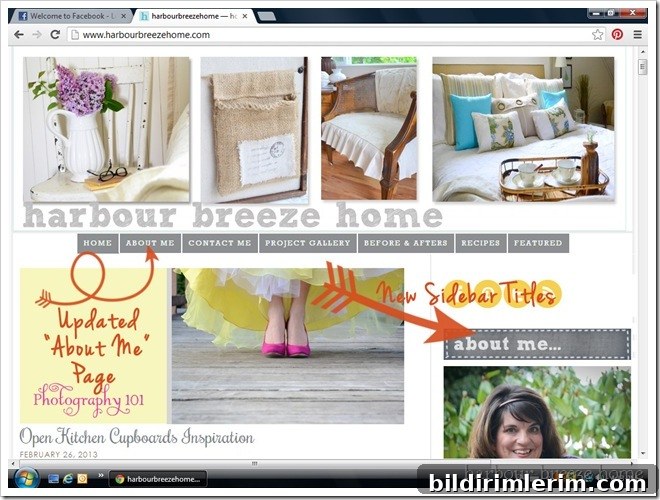
As I was making these updates I also realized I’d just passed the one-year mark since switching this site over to WordPress. It’s been a steep learning curve and a lot of trial and error, but also a fun process. I don’t claim to be a developer or a designer—I learned almost everything by reading tutorials, asking questions in forums, and following the generous advice of other bloggers and designers.
If you don’t blog, this may seem dull. But if you use WordPress, I hope a few of the practical tips and plugin recommendations below will be useful. There are thousands of plugins available, and it can be overwhelming to choose the ones that are reliable, well-maintained, and suited to your needs. Here are seven plugins I’ve used and why I like them.
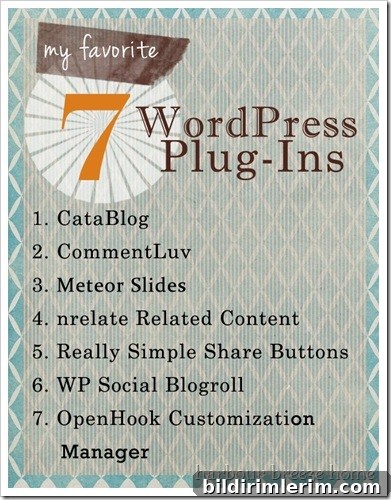
Seven WordPress Plugins That Worked Well for Me
- CataBlog — I use this plugin to create a clean Project Gallery page. It’s straightforward to set up and manage, and it keeps portfolio-style posts organized so visitors can browse projects easily. When I update the gallery, the plugin makes it simple to add images and descriptions without rebuilding a page from scratch.
- CommentLuv — This plugin rewards commenters by automatically linking to their most recent blog post. It encourages engagement and community because readers appreciate the extra exposure, and it can help foster more thoughtful discussion in your comments section.
- Meteor Slides — Meteor Slides powers the rotating recent-post images below my header. It provides a simple, attractive slider that highlights posts visually. Pairing it with a customization manager makes placement and styling easier, and helpful video tutorials for the plugin made the initial setup less intimidating.
- nrelate (related content) — When I moved to WordPress I missed the “You May Also Like” or related-post boxes that help readers discover older content. A related-content plugin restored that functionality, automatically suggesting posts that match the current article so visitors keep exploring the site.
- Really Simple Share Buttons — Choosing social sharing buttons was harder than I expected. I wanted clean, unobtrusive buttons for Pinterest, Facebook, and Twitter that wouldn’t overpower the post content. This plugin offers basic, tasteful buttons above and below each post, which is exactly what I wanted.
- WP Social Blogroll (Feed Reading Blogroll) — I like having a sidebar list of favorite blogs that updates automatically when those blogs publish new posts. This plugin aggregates feeds and keeps the blogroll current without manual maintenance, which keeps the sidebar fresh and useful for readers.
- OpenHook Customization Manager — This one is a bit more technical, but it’s very handy. It defines areas of your theme where you can “hook” custom code or widgets, making it easier to place elements like sliders, ads, or other custom bits without editing theme files directly. If you’re comfortable copying and pasting small snippets, it opens up a lot of flexible placement options.
Practical Tips and a Few Notes
Although I’m not a tech professional, I’ve learned a lot by asking for help and reading documentation. Online forums and community-driven tutorials are incredibly valuable, and most of the time someone else has already solved the problem you’re facing. Don’t be shy about posting your question—chances are it will be answered quickly and clearly.
When choosing plugins, I look for a few key things: recent updates, positive user ratings, and documentation or tutorials. Plugins that are actively maintained are less likely to cause compatibility problems after WordPress core updates. I also test new plugins on a staging site or backup my site before activating something that affects many pages.
If you use WordPress, do you have any favorite plugins you’d recommend? I’m always open to learning about better tools or approaches, especially ones that improve site performance, security, or the reader experience.
Thanks for reading—happy blogging and happy plugin hunting!
