Blog Redesign and My Favorite WordPress Plugins
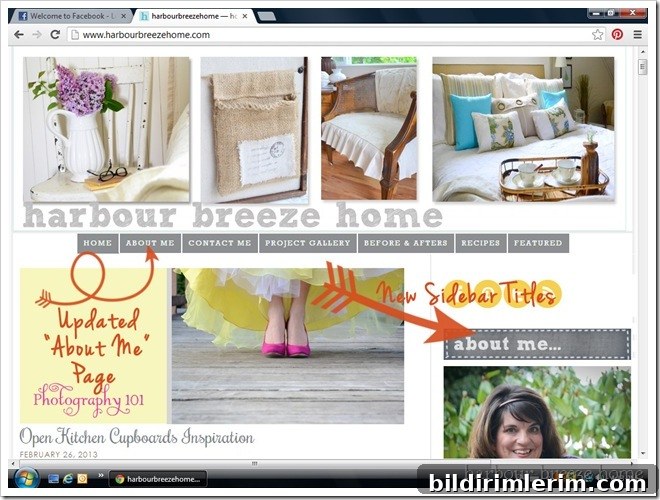
I’ve been working on a small blog redesign over the past few days—perhaps you’ve noticed some subtle changes. I wanted a fresher look and a few functional updates, so I updated sidebar titles, refreshed the About Me and Project Gallery pages, and added clearer blog buttons to improve navigation and user experience.
During this process I realized I recently passed the one-year anniversary of switching the blog over to WordPress. It’s been a rewarding learning curve. If you don’t blog, this might sound tedious, but for fellow WordPress users I hope some of these insights and plugin recommendations prove helpful.
I learned almost everything about WordPress from generous bloggers, designers, and community forums. I’m not a computer engineer or a professional designer—just someone who spent many hours reading tutorials and asking questions. Over time I found a handful of plug-ins that consistently helped me with layout, sharing, and site features. Below are seven that I use and recommend, along with brief notes on how each one has helped the blog.
- CataBlog — I used this to create a Project Gallery page. There’s a great step-by-step tutorial that shows how to set up a gallery-like project page, and I still refer back to it whenever I update the gallery. It’s straightforward and keeps projects organized and visually appealing.
- CommentLuv — This plugin automatically links a commenter’s latest blog post when they leave a comment on your site. It encourages community engagement by giving commenters a little extra visibility and helps build conversations between bloggers.
- Meteor Slides — Meteor Slides powers the recent-post slider under my header. It’s easy to configure and integrates well with other elements on the site. While installing it I discovered another helpful tool (listed below as #7) that makes placing the slider easier. The plugin author provides useful video tutorials that walk through installation and usage.
- nrelate — After switching to WordPress I missed the “You May Also Like” style related-post boxes. This plugin reintroduced related-content boxes and helps keep readers on the site by suggesting other posts they might enjoy.
- Really Simple Share Buttons — I wanted a clean, unobtrusive social sharing option above and below each post. These buttons are plain, simple, and avoid the flashy or floating styles that can distract from content. They work well for readers who want to share posts to Pinterest, Facebook, or Twitter without adding visual clutter.
- WP Social Blogroll — I like having a blogroll of favorite blogs that updates automatically when those blogs publish new posts. This plugin keeps that list current on the sidebar, so visitors can easily see active blogs I follow and recommend.
- OpenHook Customization Manager — This one is a bit more technical, but it proved extremely useful while installing Meteor Slides. OpenHook defines editable “hook” areas in your theme and lets you attach code or short content blocks to those areas. That makes it simple to place items like sliders or widgets in precise spots without modifying theme files directly.

I hope these plugin suggestions are helpful if you use WordPress. I can’t provide technical support or detailed troubleshooting here—I’m not a tech expert—but I can attest to the value of community forums and tutorials. When I started, I hesitated to ask questions, but I learned quickly that others are often experiencing the same problems. Asking in forums usually leads to fast, practical answers and saves a lot of time.
If you use WordPress, do you have any favorite plug-ins you’d recommend? I’m always looking for tools that improve site performance, reader experience, or ease of design.